Recruitment Automation Software: A Practical Guide for Small Businesses
Recruitment automation software helps employers complete repetitive hiring work without turning every application, screening call, and interview booking into a manual task. It can collect candidate information, check essential requirements, review CVs against role criteria, conduct structured first-round interviews, schedule appointments, and organise evidence for a hiring manager.
Recruitment automation is not one feature or one kind of product. Some platforms find candidates, while others manage applications inside an applicant tracking system (ATS). HireMike focuses on the work after people apply: screening, first-round interviews, shortlisting, and scheduling for small teams without an internal recruiter.
The objective is not to remove people from hiring. Good automation removes avoidable administration, applies an approved process consistently, and gives the employer better evidence for a human decision.
About this guide: HireMike provides recruitment automation software for small businesses. This article explains the category, including where HireMike is a practical fit and where a different type of system may be more appropriate.
What is recruitment automation software?
Recruitment automation software is technology that completes rules-based or repeatable tasks across the hiring process. It can move information between stages, prompt candidates to take the next step, and turn applications or interviews into structured records.
The phrase covers several jobs. Recruiting automation tools may publish vacancies, search talent databases, or run outreach campaigns. After people apply, software may check eligibility, parse CVs, organise relevant evidence, send interview invitations, conduct screening conversations, and update candidate statuses. Larger platforms may continue into offers and onboarding.
Artificial intelligence is often one component, not the entire system. A knockout question can follow a simple rule; reviewing varied CV language against job requirements is more likely to use AI; calendar booking is workflow automation. A useful product combines the right method with a clear process.
What can recruitment automation software automate?
The most valuable tasks to automate are usually high-volume, repeatable, and necessary, but do not require the employer to make the final judgement.
Candidate intake and knockout screening
A consistent application form gives every candidate the same opportunity to provide relevant information. Employers can then use knockout questions for genuine non-negotiables such as work eligibility, a required licence, location, or availability.
These questions should be used sparingly. A preference is not a genuine requirement, and unnecessary filters can exclude capable people before their evidence is reviewed. The employer should approve each rule before the role opens.
CV and application review
When a vacancy attracts dozens of applications, manual review can become inconsistent. Fatigue and queue order may affect how much attention each candidate receives.
Recruitment screening software can compare each application with the employer's approved criteria and organise the supporting evidence. The useful output is not merely a score. It is an explanation of what the system found, what appears to be missing, and where a hiring manager should look. Our guide to resume screening software examines this distinction in more detail.
Structured first-round interviews
First-round interviews often repeat the same questions about experience, motivation, availability, and job-specific situations. Software can conduct these conversations in a consistent format, record the responses, and produce a transcript and summary.
A conversational system can also ask a relevant follow-up when an answer is incomplete. If a candidate describes a team result without explaining their own contribution, for example, it can ask what action they personally took. The core assessment should remain consistent; follow-ups should clarify evidence rather than create a different test for each person.
Scheduling and candidate communication
Interview coordination creates work without improving the decision itself. Automation can send invitations, expose approved calendar availability, confirm appointments, and deliver reminders. It can also keep candidates informed when they move to the next stage.
The result should feel clearer for candidates, not colder. Messages need to explain what will happen, what technology is involved, and where to ask for help or an accommodation.
Documentation and shortlisting
After screening, employers still need comparable records. Automation can bring the application, CV evidence, interview recording, transcript, and criteria assessment into one package, giving the hiring manager a stronger basis for deciding who deserves a deeper conversation.
How HireMike's recruitment automation workflow works
HireMike is designed for small businesses that need help managing the first round of hiring rather than a large enterprise recruitment suite.
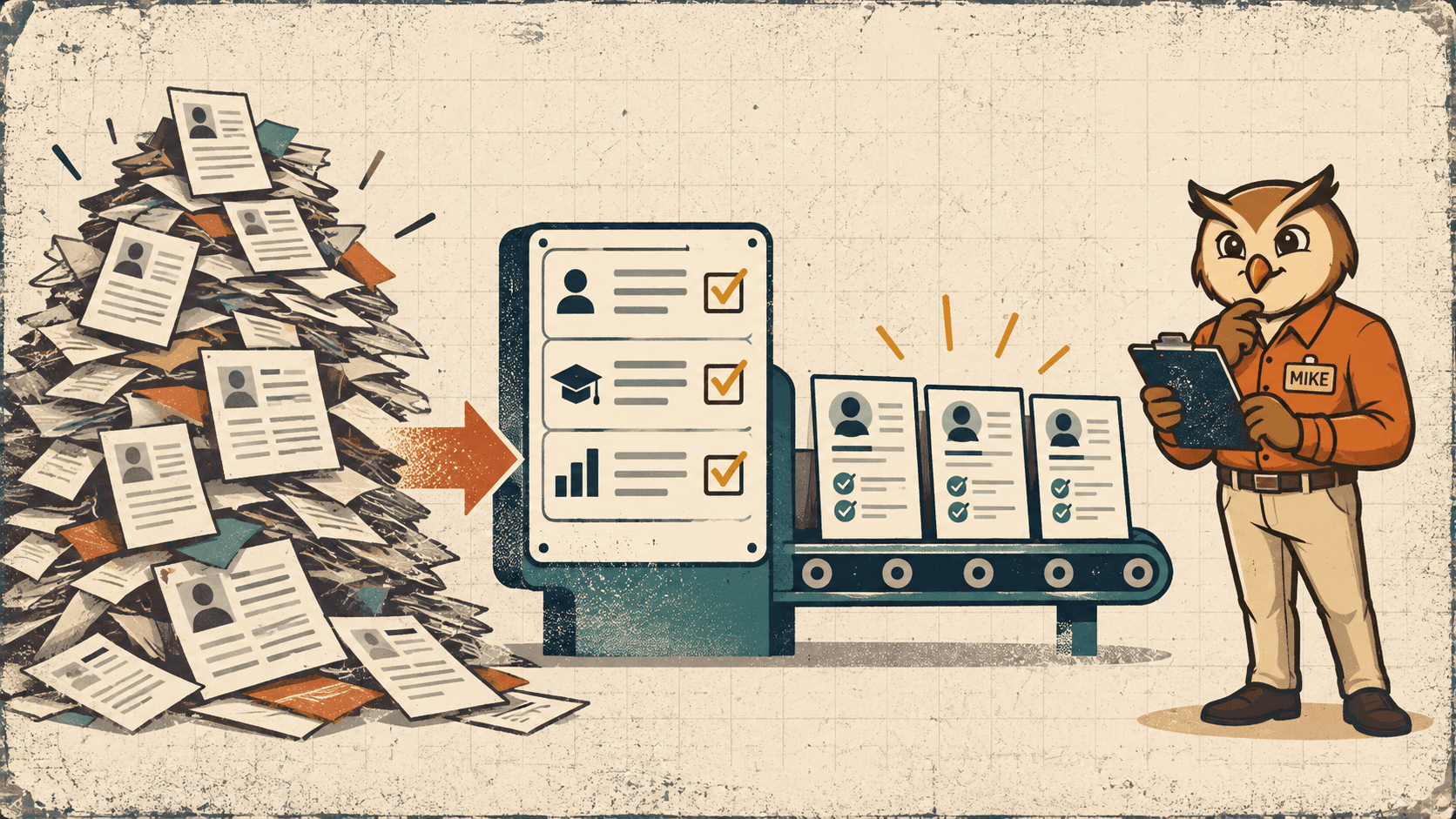
The employer creates a role and defines what success requires. HireMike can propose screening criteria and interview questions, but the employer approves them before they affect any candidate. Applicants then complete a mobile-friendly application, upload their CVs, and answer approved knockout questions.
HireMike assesses the remaining applications against the role criteria and presents the result with supporting evidence. The hiring manager reviews that information and decides who advances. The software does not make the hiring decision or automatically promote a candidate without the employer's involvement.
Selected candidates receive an invitation to a structured first-round video interview, choose an available time, and join through a browser. The employer receives a criteria breakdown, summary, timestamped transcript, recording, and highlights before deciding who to meet in the final round.
This workflow connects application intake, candidate screening, conversational interviews, and scheduling without forcing a small team to assemble several disconnected tools. The complete product journey is available on the How HireMike works page.

Recruitment automation software vs an ATS
Recruitment automation software and applicant tracking systems overlap, but they are not interchangeable. An ATS is primarily a system of record for vacancies, applicants, stages, and notes. Automation is the work performed within or around that record.
| Question | Applicant tracking system | Recruitment automation software |
|---|---|---|
| Primary purpose | Store and manage candidate records | Complete repeatable recruiting tasks |
| Typical strengths | Pipeline visibility, collaboration, approvals, reporting | Screening, communication, interviews, scheduling, workflow actions |
| Best fit | Teams that need a central recruitment database | Teams that need to reduce manual work at specific hiring stages |
| Does it make the final hiring decision? | It should not | It should not |
Some ATS products include substantial automation, while specialist tools may cover a narrower workflow. If an existing database works but screening consumes too much time, replacing the entire system may be unnecessary. If records are scattered across email and spreadsheets, a stronger system of record may be the first priority.
For comparison, Workable is a competing platform that places recruiting automation inside a broader ATS and HR system. This illustrates why buyers should distinguish a complete system of record from a specialist tool focused on a particular hiring stage.
Our guide to applicant tracking systems for small businesses can help you decide which problem you actually have.

Why small businesses need a different kind of automation
Enterprise platforms often assume permanent talent teams, continuous hiring, and annual software budgets. Small businesses usually hire in bursts. A founder, operations manager, or team lead may act as recruiter for a few weeks and then return to their main job.
The software therefore needs to be quick to configure, economical when hiring pauses, and understandable without specialist training. It should produce evidence a busy manager can verify, not an unexplained score.
The strongest small-business use case is not “automate everything.” It is “make the repetitive first round manageable,” reserving the employer's attention for judgement and the final decision.
What should remain human in automated recruitment?
Automation can increase consistency, but it cannot make irrelevant criteria fair or accurate. Human responsibility begins before the first application arrives.
Employers should define job-related criteria, distinguish genuine requirements from preferences, and check the questions candidates will receive. The U.S. Office of Personnel Management's guidance on structured interviews explains why asking predetermined questions and using a common rating scale creates a more consistent basis for assessment.
Human review also matters after the software produces an assessment. Missing evidence is not automatically negative evidence. A CV may omit a relevant achievement, or a candidate may need an alternative way to complete the process. The EEOC's guidance on AI and disability discrimination reminds employers to consider accessibility and reasonable accommodations when automated tools are involved.
Before choosing a platform, ask who approves the criteria, who can override a recommendation, and what evidence is visible. The NIST AI Risk Management Framework offers a broader approach to AI risk and accountability. In practice, the software may organise evidence, but an accountable person must own the decision.
Candidates should know when they are interacting with AI, what information is collected, and how long it is retained. HireMike's privacy policy explains how candidate records, recordings, transcripts, and service-provider access are handled.

How much does recruitment automation software cost?
Pricing models commonly include per-user subscriptions, annual contracts, per-vacancy fees, or usage-based charges. The right model depends on hiring frequency. A subscription may suit a company recruiting every week, while usage-based pricing can be more efficient for a business hiring periodically.
HireMike uses pay-per-use pricing. Account creation, job posting, application collection, and knockout screening are free. AI CV screening costs USD $0.50 per application, and each completed AI first-round interview costs USD $10. There are no monthly fees or annual contracts.
For example, screening 80 applications costs $40. If 15 candidates complete a first-round interview, those interviews cost $150, bringing the total to $190. Actual cost depends on application volume and how many candidates advance. Current rates are on the HireMike pricing page.
When comparing products, calculate the cost of a typical vacancy. Include implementation, minimum commitments, extra seats, integrations, and any charge for storing or exporting candidate data.
How to choose recruitment automation software
Start with the stage that creates the most friction. A sourcing product will not solve slow interview coordination, and an interview tool will not repair unclear role criteria. Map the process, then identify where volume, delay, or inconsistency is highest.
Examine the evidence behind the output. A screening system should show why a candidate appears relevant, expose the underlying application, and allow a person to correct or override the result. Ask for a demonstration using a realistic role.
Test the application and interview on a phone, read the automated messages, and confirm that candidates can request help or an accommodation. Find out whether they must create an account or install software.
Treat data governance as a selection criterion, not a footnote. Ask where information is processed, who can access it, how long it is retained, whether it trains models, and how it can be deleted or exported.
Finally, evaluate operational fit. A small team may value fast setup and usage-based pricing, while a large employer may need extensive integrations, permissions, and audit logs. The best recruitment automation software solves the real bottleneck while preserving a clear path to a human decision.
Frequently asked questions
What is the main purpose of recruitment automation software?
Its purpose is to reduce repetitive hiring work while keeping the process consistent and reviewable. That may include sourcing, application screening, scheduling, first-round interviews, communication, or record management.
Can recruitment automation software replace a recruiter?
It can complete administrative and structured screening tasks, but it should not replace human judgement. People still need to define the role, review context, speak with finalists, and make the hiring decision.
Is recruitment automation software the same as AI recruiting software?
Not exactly. Recruitment automation is the broader category and includes rules, calendar workflows, templates, and status changes. AI recruiting software uses AI for tasks such as interpreting CVs, summarising interviews, or conducting conversational follow-ups.
Is recruitment automation suitable for a small business?
Yes, particularly when one person reviews a large applicant pool alongside another job. Look for quick setup, transparent results, human approval points, accessible candidate experiences, and flexible pricing.
What should a business automate first?
Automate the most repetitive stage that is already well defined. For many small teams, that is application screening, first-round scheduling, or interview documentation. Define the role and assessment method first.
How can employers use recruiting automation responsibly?
Use job-related criteria, tell candidates how the process works, provide a route to support or accommodation, review the evidence behind recommendations, and keep consequential decisions with an accountable person. Employers should also review the vendor's privacy, retention, security, and AI-governance practices.
Make the first round manageable
Recruitment automation software is most useful when it creates capacity without obscuring responsibility. It should give every applicant a clear process, give the hiring manager comparable evidence, and make it obvious where human judgement enters the workflow.
For small teams, that can turn an overflowing inbox and a week of screening calls into an organised first round. HireMike combines application intake, CV screening, structured conversational interviews, scheduling, and reviewable candidate records in one usage-based workflow. You can review the workflow above or create an account to start a role.